GPS Tracker: Find Phone
- 4.2
- Rating
- 5.00M
- Installs
- Free
- Price
 Analysis by App-foxy
Finding a family member’s phone quickly sounds simple, but location tools are only useful when they fit naturally into everyday routines. I spent time looking at GPS Tracker: Find Phone as a family-safety and navigation app, paying particular attention to what its free access offers, where paid value may enter the picture, and how practical it feels beside the location tools many people already have on their phones.
My first impression is that this is a focused product rather than a broad navigation suite. It is built around locating people and phones, not around turn-by-turn driving directions, public transport planning, or discovering places. That narrower purpose is important: if your main concern is knowing whether a child has arrived, finding a misplaced device, or checking a family member’s shared position, the concept is easy to understand. If you want a complete map replacement, it is the wrong category of tool.
How GPS Tracker: Find Phone fits into daily safety
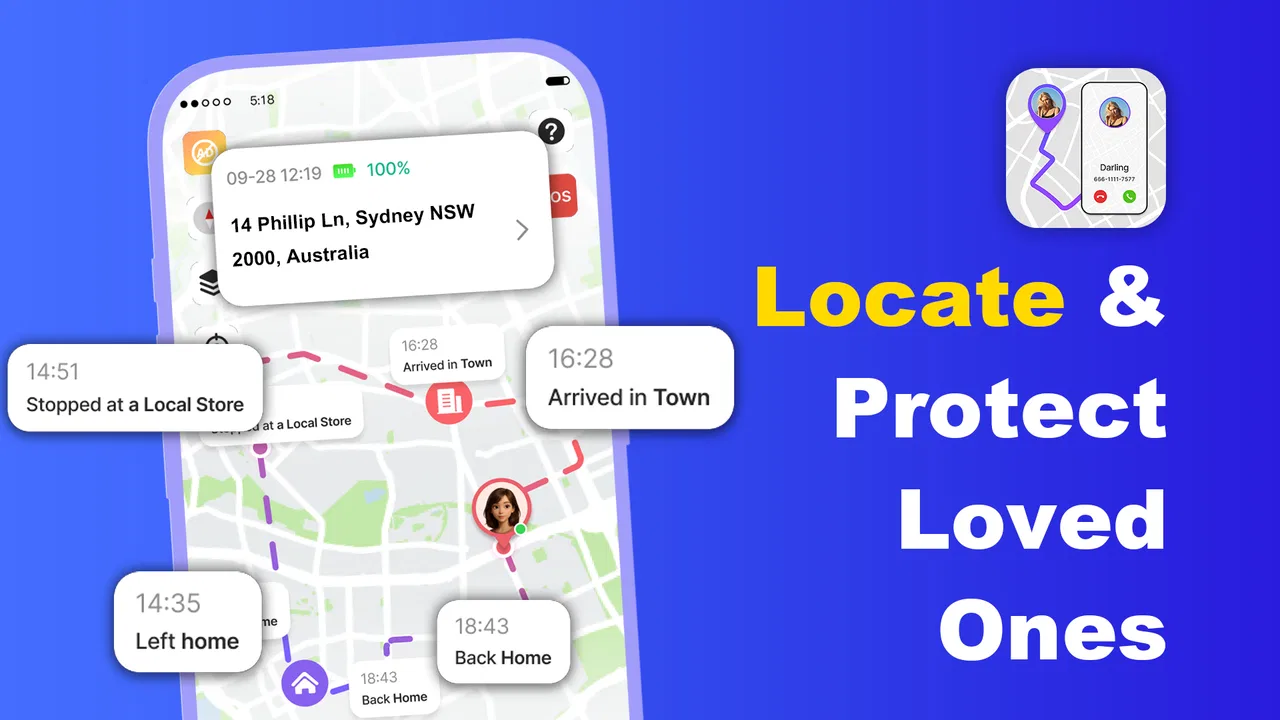
GPS Tracker: Find Phone is a free Maps & Navigation app from Mitra MT. Its store short description is “GPS Tracker,” while its broader purpose is presented as helping users find family members and phones quickly through real-time location tracking for safety. The app is rated for Everyone, which makes its intended audience broad, although responsible use still depends on clear agreement between the people being located.
You May Also Like

 Blood Strike: 2.5 Anniversary
Blood Strike’s Loadouts Turn Every Drop Into a Tactical Gamble
A close look at Blood Strike’s custom loadouts: how fast access to signature weapons reshapes its battle royale rhythm, rewards preparation, and narrows the gap between fights.

 Pandora - Music & Podcasts
Pandora’s Music Is Easy to Start, but Harder to Recover
Pandora’s strength is its low-effort path from a seed to a station. Its weak spot is how much confidence it asks you to place in connection, setup, and quiet recovery.

 8 Ball Pool
 Is Built on Rivalries, Rematches, and Routine
A close look at the rivalries, rematches, shared routines, and unanswered safety questions that turn a quick pool match into a persistent mobile community.

 Samsung Music
’s Quiet Strength Is Playing What You Already Own
Its reach comes less from spectacle than from dependable access to a personal library. That simplicity is both the app’s strongest retention engine and its ceiling.

 AccuWeather: Weather Radar
AccuWeather Review: A Quick, Clear Forecast for Everyday Decisions
For everyday plans, the best forecast is the one you can understand quickly. AccuWeather makes rain timing, radar, and local conditions easy to act on, with a few trade-offs.

 Hill Climb Racing
Why Hill Climb Racing Still Turns Crashes Into One More Run
A tiny car, a bumpy hill and one more upgrade: Hill Climb Racing keeps resurfacing because its simple chaos makes every near-miss feel personal.
More From Our News Desk



The app was released on February 6, 2026, and the current version is 1.0.4. It supports devices running Android 7.0 or later, so compatibility should be comfortable for many older Android phones as well as newer models. Its listing shows over one hundred thousand installs, but the average rating currently stands at zero, so there is not yet a meaningful public rating signal to rely on when judging consistency or long-term reliability.
That combination creates an interesting first decision. The app is accessible enough to try without an upfront purchase, but its public track record is still developing. I would treat it as a practical candidate for a small, low-risk trial rather than immediately making it the only location method for an important family routine.
What the free entry point really means
The app is listed as free, which removes the biggest barrier to testing it. You can approach it as a tool to evaluate with your own household rather than committing money before understanding whether the interface and location behavior suit you. That matters with tracking software because convenience, trust, and clarity are often more important than a long feature list.
At the same time, free does not mean every part of the experience is necessarily included without conditions. In-app purchases are listed from $2.99 to $9.99 per item. Those figures establish a real paid layer, but they do not by themselves explain which functions are free, which functions require payment, or whether a particular purchase is useful for your needs. I would therefore avoid assuming that paying automatically improves the core experience.
My advice is to test the free path first with a willing family member. Check whether you can complete the basic setup, understand whose location you are viewing, and use the app during a normal day without confusion. Only after that should you consider an optional purchase. This approach keeps the decision tied to actual value instead of treating the presence of in-app purchases as a reason to upgrade.
Where the app can deliver practical value
The strongest use case is a household that wants a dedicated place to think about shared location. Imagine a parent leaving work while a teenager is walking home. Rather than sending repeated “Where are you?” messages, both people can use an agreed tracking routine. The parent checks the current location when needed, while the teenager avoids interrupting the trip to provide constant updates. The benefit is not just speed; it is reducing unnecessary communication at a moment when attention should stay on the road or surroundings.
A second useful situation is a misplaced phone. If the device is still connected and the tracking arrangement is functioning, a location-focused app may make the search more direct than opening a general map and trying to reconstruct where the phone was last seen. The important word is “may”: a tracker is not magic, and its usefulness depends on the phone being available to report its position. I would still keep ordinary recovery habits in place, such as remembering common surfaces, bags, and charging spots.
There is also value for families coordinating around changing plans. A shared location can help someone decide whether to wait, leave, or call, especially when arrival times are uncertain. This is more useful than a static address because the situation changes while people are moving. However, I would use it as a convenience and safety aid, not as a substitute for direct contact in an emergency.
One less obvious advantage of a focused tracker is mental separation. General phone ecosystems often mix location sharing with photos, messages, accounts, and device-management settings. A dedicated app can make the purpose clearer for relatives who do not want to learn a larger platform. That clarity can be valuable for older family members, provided the setup is explained patiently and everyone understands what is being shared.
Small habits that make tracking more useful
The first habit I recommend is agreeing on when location sharing is actually needed. Continuous checking can create anxiety and make a safety tool feel intrusive. A better routine is to use it around specific journeys, pickups, evening arrivals, or travel days. Clear expectations also make it easier for the person carrying the phone to notice when tracking is not working, rather than assuming someone is watching every moment.
The second is to give each phone a recognizable role during testing. Try the app with one person at home and another person moving through a familiar route. This makes it easier to tell whether a displayed position belongs to the correct person and whether the experience is understandable under ordinary conditions. Testing from a sofa alone will not reveal the practical friction that appears when someone is walking, entering a building, or changing plans.
The third is to treat the displayed position as context, not proof of exact presence. A map marker can help you decide whether to call or wait, but it should not be used to accuse someone of lying or to make a high-stakes decision without confirmation. Location technology can be delayed, imprecise, or affected by the phone’s environment. That is a general reality of tracking, and it is especially important when the app has not yet built a substantial public rating history.
A fourth useful workflow is to keep the tracker for coordination while using ordinary phone calls for confirmation. For example, check the location to see whether a family member is near the meeting point, then call if the timing looks unusual. This avoids turning the app into a silent monitoring system and gives everyone a simple fallback when the map view does not answer the real question.
Trade-offs beside familiar alternatives
Many Android users already have built-in tools for locating their own devices or sharing a position through a broader account ecosystem. Those alternatives may be more familiar and may connect naturally with services already on the phone. GPS Tracker: Find Phone has a different appeal: it presents itself specifically as a GPS tracker for family and phone-finding needs, which may feel more direct for someone who does not want a general-purpose platform.
The trade-off is maturity and certainty. Established device ecosystems often benefit from years of user feedback and integration. This app’s current average rating of zero means there is no useful crowd-based quality signal yet. That does not prove the app is poor, but it does mean I would be more careful about depending on it alone for a child’s commute, an older relative’s safety, or a situation where every location update matters.
Messaging apps with location sharing can be better when the need is temporary. If you only want to tell a friend where to meet, a one-time shared location inside a conversation may involve less setup. A dedicated tracker becomes more attractive when the same family members need a repeatable arrangement rather than a new message each time. The right choice depends on whether you value a separate tracking workflow more than the convenience of tools you already use.
For driving and route planning, a conventional navigation app remains the better option. This tracker should not be judged by traffic guidance, route quality, or place search because those are not its central job. Likewise, for lost-device recovery, the phone’s native device-finding service may be preferable if your priority is account-level recovery rather than family location sharing. The app makes the most sense when the people side of tracking is the main concern.
Where friction and uncertainty matter
The biggest practical weakness is that location sharing can be misunderstood. A family member may think the app shows a perfectly live position, while another person may interpret it as occasional updates. Before relying on it, I would make sure everyone knows what the map means, when it will be checked, and what to do if the position looks old or unexpected. A simple agreement prevents more trouble than any extra feature.
Battery and connectivity are also real-world considerations for any location tracker. A phone that is switched off, disconnected, or unable to report its position cannot provide dependable live information. I would not promise a child or relative that the app guarantees safety, and I would not use it as the sole response plan for an emergency. Direct contact and local emergency services remain more appropriate when immediate help is required.
The paid layer deserves caution as well. Each in-app purchase is listed between $2.99 and $9.99, but the value depends entirely on what a particular purchase changes for your household. I would not buy simply because a premium prompt appears. First identify a specific inconvenience in the free experience, then decide whether the purchase addresses that inconvenience clearly enough to justify the cost.
Privacy and consent should be part of the setup conversation, not an afterthought. Tracking a family member without their knowledge can damage trust and may be inappropriate even when the stated goal is safety. I would install it only for people who understand the arrangement and agree to it. For children, parents should set expectations in an age-appropriate way rather than presenting monitoring as invisible control.
Who is most likely to get value
I see the best fit in small families that want a straightforward location-focused experiment. It may suit a parent and older child coordinating school or work travel, relatives checking arrivals during a busy day, or a household that wants a separate app for family location instead of mixing that need with a wider social or messaging service.
It can also suit someone using an older Android phone, since the minimum operating system is Android 7.0. That does not guarantee identical behavior across every device, but it keeps the app within reach for phones that are not running the newest software. The free starting point is helpful here because users can test compatibility before spending anything.
I would be more hesitant to recommend it as the only safety solution for vulnerable people, solo travelers in high-risk situations, or families that require a proven history of dependable tracking. The zero average rating gives too little public evidence for a confident reliability judgment. In those cases, I would favor a more established built-in service or a solution whose behavior and support record are already well understood.
It is also not a strong match for somebody looking for a full navigation package. If your goal is directions, traffic avoidance, route planning, or discovering nearby businesses, you will need a conventional navigation tool instead. This app’s value comes from the relationship between people and their phones, not from replacing a map app used behind the wheel.
My value-based verdict
My view is cautiously positive for testing, not unconditional dependence. The free access makes GPS Tracker: Find Phone easy to try, and its focused purpose could be useful for families who want a dedicated way to coordinate locations. The practical value is highest when everyone agrees on a simple routine and uses the map as a supplement to communication.
The paid options should be judged individually rather than assumed to be necessary. With purchases ranging from $2.99 to $9.99 per item, the cost is clear enough to consider, but the decision should follow a demonstrated need in your own household. If the free experience already handles your occasional location checks, paying may add little value. If a specific paid function solves a repeated problem, the upgrade could be reasonable, but I would make that choice only after hands-on testing.
For me, the deciding factor is fit. I would recommend giving it a careful trial to a family that wants a focused tracker and accepts the need for consent, sensible expectations, and a backup way to contact one another. I would skip it for turn-by-turn navigation, anonymous monitoring, or situations where an unproven app must carry the entire burden of safety. In short, the best reason to try it is its focused family-and-phone tracking purpose, while the best reason to stay cautious is the limited public evidence about its reliability.
As a free Maps & Navigation app from Mitra MT, it offers a low-cost way to explore a dedicated tracking workflow on compatible Android devices. I would install it, test it on an ordinary journey, discuss the boundaries with the people involved, and only then decide whether it deserves a permanent place in the family’s routine.
FAQs for GPS Tracker: Find Phone
01What features does the GPS Tracker: Find Phone app offer?
The GPS Tracker: Find Phone app provides real-time location tracking, allowing users to pinpoint the exact whereabouts of their device. It also includes features like location history, geofencing alerts, and sharing locations with trusted contacts. This makes it a comprehensive tool for safety and convenience.
02Is the GPS Tracker: Find Phone app free to use?
The app is available as a free download with basic functionalities. However, it offers in-app purchases and subscription options to unlock premium features such as advanced location history and more frequent updates. Users can choose the plan that best suits their needs.
03How accurate is the location tracking in the GPS Tracker: Find Phone app?
The GPS Tracker: Find Phone app uses advanced GPS technology to provide accurate and reliable location data. Accuracy can vary depending on factors like device settings, GPS signal strength, and environmental conditions, but it generally offers precise tracking within a few meters.
04How secure is my data with the GPS Tracker: Find Phone app?
The app prioritizes user privacy and data security. It employs encryption protocols to protect your location data and personal information. Additionally, it requires user consent for location sharing, ensuring that your data is only accessible to those you authorize.
05Can I track multiple devices with the GPS Tracker: Find Phone app?
Yes, the app supports tracking multiple devices, making it ideal for families or groups. Users can add multiple devices to their account and monitor their locations simultaneously. This feature is particularly useful for parents or team coordinators who need to keep track of several individuals.
Pros
- Accurate real-time location tracking.
- User-friendly interface for all ages.
- Low battery consumption during use.
- Works seamlessly across platforms.
- Customizable alerts for location changes.
Cons
- Requires constant internet connection.
- Limited features on free version.
- In-app ads can be intrusive.
- Some features need frequent updates.
- Privacy concerns with location sharing.

GPS Tracker: Find Phone
Gallery